Add content
Paste text, pick a screenshot, import a PDF, or point the camera at a printed schedule.
Calendar Capture
Photo, PDF, camera
Snap a timetable, import a PDF, or paste text. Calendar Capture
pulls out every event and saves them to Apple Calendar, Google
Calendar, or a clean .ics file — in seconds.
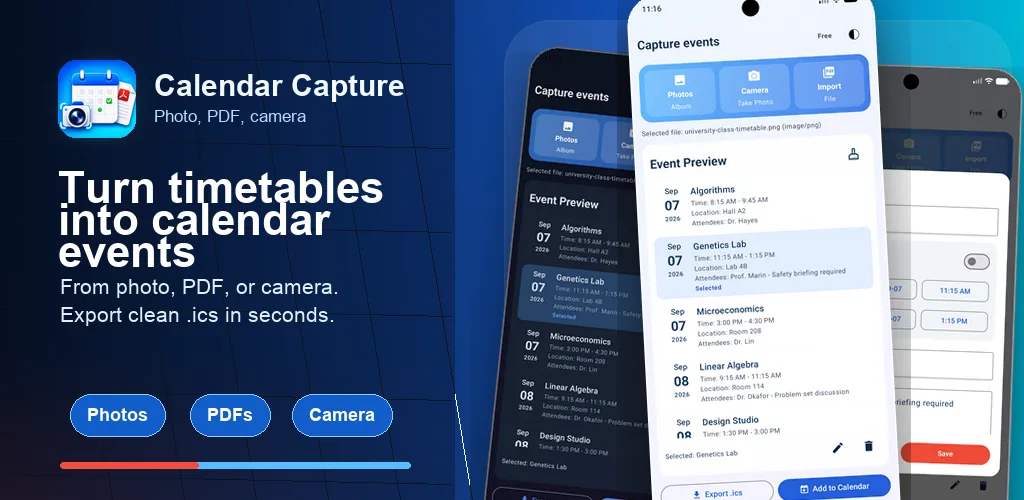
The app keeps the import flow short and focused, with a review step before anything lands on your calendar.
Paste text, pick a screenshot, import a PDF, or point the camera at a printed schedule.
The app reads the title, date, time, location, and notes for each event it finds in your content.
Check and edit the parsed events, then add them to Apple
Calendar, Google Calendar, or export an .ics file.
Anything that lists a date and a time — however it reached your phone.
A booking confirmation, a WhatsApp group message about practice times, an Instagram event poster, an email you screenshotted. Calendar Capture reads the image and pulls out the event.
Conference programmes, school term calendars, league fixture lists, travel itineraries. Multi-event PDFs come back as a list you can save in one pass.
A timetable pinned to a noticeboard, a flyer, a whiteboard, a printed handout. Take the photo — or shoot straight from the in-app camera — and let the app do the typing.
Copy the relevant part of an email, a message, or a web page and paste it in. Useful when the details are scattered across a long block of prose.
Save to the calendar you already use, or take an
.ics file anywhere else.
Built for the moments when a schedule arrives as a picture instead of an invite.
Photograph the class timetable on the first day of term and get every lecture, lab, and seminar into your calendar before the first session starts.
School newsletters, sports fixture lists, and term-date PDFs turn into events you can drop onto a shared family calendar in one go.
Conference agendas and training schedules arrive as slides or PDFs. Capture the sessions you care about instead of retyping them between meetings.
Tour itineraries, tickets, and booking confirmations become a day-by-day calendar you can check offline once it's saved.
Calendar Capture does not run its own backend for your content. Data you choose to process is sent directly from the app to Google APIs. The app does not store your submitted content on a custom server, and your events stay in the calendar you chose.
Full details are available in the Privacy Policy. For help with the app, visit Support.
Quick answers about what the app does and how it works.
Calendar Capture turns screenshots, photos, PDFs, camera
captures, and pasted text into structured calendar events. You
review the parsed events and save them to Apple Calendar,
Google Calendar, or export an .ics file.
Open the app, choose the screenshot from your photo library, and Calendar Capture reads the event details out of the image. Review the extracted title, date, time, and location, then save. There's a step-by-step walkthrough with tips for getting cleaner results.
Photos and screenshots (PNG/JPEG), PDF documents, live camera capture, and pasted plain text.
Yes. A full timetable, conference agenda, or fixture list comes back as a list of separate events, so you can save a whole term or trip instead of typing each entry by hand.
Apple Calendar (via EventKit), Google Calendar (via the Google
Calendar API), and any calendar that imports
.ics files, including Outlook.
Yes — Calendar Capture runs on iOS, iPadOS, and Android.
Calendar Capture is free to download on the App Store and Google Play.
Calendar Capture does not operate a custom backend that stores submitted content. When you choose to parse content, the selected text, image, or PDF is sent directly from the app to Google APIs for processing. See the Privacy Policy for details.
Yes. Every parsed event is shown for review and editing before anything is added to your calendar.
Students importing class timetables, parents capturing school or sports schedules, professionals turning conference agendas into events, and travellers converting itineraries into calendar entries.